Network transparency makes distance irrelevant

The recent version of Ubuntu and the upcoming version of Fedora both ship with PulseAudio, a sound server which supports, among other things, network-transparent operation: you can take any program that generates sound and redirect that sound to be played on any other machine with a PulseAudio server.

PulseAudio is part of a long and venerable history of using computers remotely. People have been using SSH and X11 forwarding for ages now. CUPS and SANE allow you to access a printer or a scanner from halfway around the world. x2x lets you move the cursor on one computer with the mouse on another. And SSH's port-forwarding feature builds bridges to enable pretty much any service to be used from anywhere, even if the server is behind a firewall or is only serving to localhost. Features like these aren't unique to the modern Unix-like operating systems, but it is only there that they are widely enough used that people actually rely on them to get things done. Perhaps more critically, it is only there that they are easy enough to configure that people can use them on an ad-hoc basis.

In contrast, Windows or Mac OS, users are very much tied to individual machines. It does not really occur to people that they could use more than one computer, or that they would even want to.

I think this reflects one of the philosophical differences between Unix-like operating systems and others. Under Unix, a computer provides a number of resources (such as software, data, computation capacity, or specialized hardware) from which you can pick and choose. Because of network transparency, physical proximity is unimportant. Channels of communication can be layered and rerouted arbitrarily. You can make computers work together as ensembles. Individual computers are fungible.

Just a few weeks ago, for my research work, I wrote a script to distribute the processing of hundreds of files among a bunch of free machines. SSH is set up with public-key authentication there, so all the distribution of work happens without human intervention. The whole thing, including parsing the input, distributing those jobs, and load balancing, is about 50 lines of Python, using software which is standard on most any actual GNU/Linux system.

I do not think it is accidental that this kind of flexibility started in OSes built on free software. People who are trying to sell you software licenses do not have as much incentive to allow individual computers to be used in whatever way you please.

Python is a great teaching language... for TAs

Repetitive tasks put the brain in a state where it is more likely to make mistakes, say scientists. I've been grading CS problem sets for 6.00 and I can personally attest to that. The drudge work in this class (for the TA, anyway) usually consists of verifying that the students' solutions produce expected behavior on a large set of test cases. I want to make the computer work for me as much as is possible here. Less drudgery for me means my students get more helpful high-level comments on their psets. Writing good tests takes time, but I would have spent more time testing and checking (and then second-guessing my error-prone self: "Did I grade that last student's code correctly...").

The conclusion I have come to in the last couple of terms is that Python is a great language to be teaching. The built-in unittest module makes organizing and writing tests, and reading their output, really easy.

However, all is not well, yet: non-determinism is the tester's constant foe! And Python, with its myriad libraries, lets you pull in code from pretty much anywhere you please. So much for having controlled and deterministic environments. The textbook example here of non-determinism is the time module.

Usually (read: in Java), people would deal with this using dependency injection or related techniques: basically, writing a function which takes the non-deterministic part as an argument. It works great, but cluttering the interfaces and specifications in this way is not something we really care to inflict upon fledgling programmers.

The great thing about Python is that you can patch pretty much anything at runtime. When combined with the fact that Python doesn't enforce data-hiding anywhere, this means that we can perturb and control the execution of students' code in some very interesting ways.

The most important effect of this is that it totally obviates the need for user interaction. Need to provide input to a student code? Just replace raw_input with a callable of your choice. Need to read printed output programmatically? Just replace sys.stdout. In Python, every module is really a dictionary to which you can add items whenever you like, so patching just looks like this:

import ps5

# Arbitrary callable that should return input to program under test
ps5.raw_input = fake_input
# Save the real stdout for later replacement
old_stdout = sys.stdout
# Redirect stdout to a string buffer
sys.stdout = StringIO.StringIO()

It's just up to me to write a callable (possibly with state) that provides the correct input(s), and some code to process the contents of the buffer, and then I can grade most assignments without running the student's code by hand.

I can even replace module-level "constants", or even entire libraries that the student relies on:

import ps5

ps5.time = fake_time

For example, fake_time might be a class instance that implements a time method, if we expect students to be calling time.time(). So we can run tests where the student's code has to measure the passage of time, and the test doesn't have to take some large constant amount of time to run. When the students are learning to use matplotlib, we have, for TA use, a fake matplotlib module that, when asked to produce a plot, actually conveniently saves that plot to disk.

By replacing dependencies at runtime, we can test pretty much any functional aspect of student code without requiring students to conform to some (apparently) unnatural interface in advance. The students are blissfully unaware of testability issues until we choose to introduce those issues.

We can also test many non-functional requirements. For example, suppose function A is supposed to run without calling function B for efficiency reasons: before calling A, just replace B with a wrapper that notices when it's called.

It's the 21st century. TAs should not be meticulously entering test inputs into computers and cataloguing the outputs. We have computers to do that for us.

Amazing Graphics Papers: Dual Photography

This is a summary of the technique in the paper Dual Photography, which was presented at SIGGRAPH 2005. What the authors managed to do is very clever, and you can even understand the technique without knowing much high-brow math. Color me impressed.

Imagine you are photographing a scene which contains objects lit by a lamp. Suppose the light source is replaced with a structured light source, basically a projector. We could turn all the pixels of the projector on and get what is essentially a lamp. But in general we could light just some of the projector pixels, and illuminate the scene with whatever weirdly shaped light we want.

Fact: light transport is linear. So the relationship between the input vector p (which pixels on the projector are lit) and the output vector c (the brightness on each camera pixel) can be described by a matrix multiplication: c = T p. The ijth element of the matrix T is the brightness of the ith camera pixel when the jth projector pixel (and nothing else) is lit with intensity 1. (If the camera and the light source both have resolution of, say, 103×103, then p and c both have length 106, and T is a 106×106 matrix.)

We can actually construct the matrix T by lighting the first pixel, taking a picture, lighting the second pixel, taking a picture, etc. (each picture yields one column of the matrix T). And once we've done this, we can plug in any vector p we want to see what our scene would look like with arbitrary illumination from the projector. So, once we have this matrix T which completely characterizes the response of this scene to lights, we can change the lighting of the scene in post-processing.

That's already kind of neat, but the most impressive trick here is based on the fact that light transport follows the principle of reciprocity. If light of magnitude 1 enters a scene from a projector pixel a and lights up camera pixel b with intensity α, then a ray of light could just as well have entered at b and exited at a, and that light will also be passed with the same coefficient α. This is easily seen if the scene contains mirrors, but it's actually true in general, even if light is partially absorbed, reflected in funny ways on the scene, etc.

Now, what happens if we swap the locations of the projector and the camera in our scene? What's the matrix T' associated with this new scene? Because of reciprocity, it's merely the transpose of the matrix T: all the coefficients are the same, but they move around because we've swapped the 'input' and the 'output' of our system.

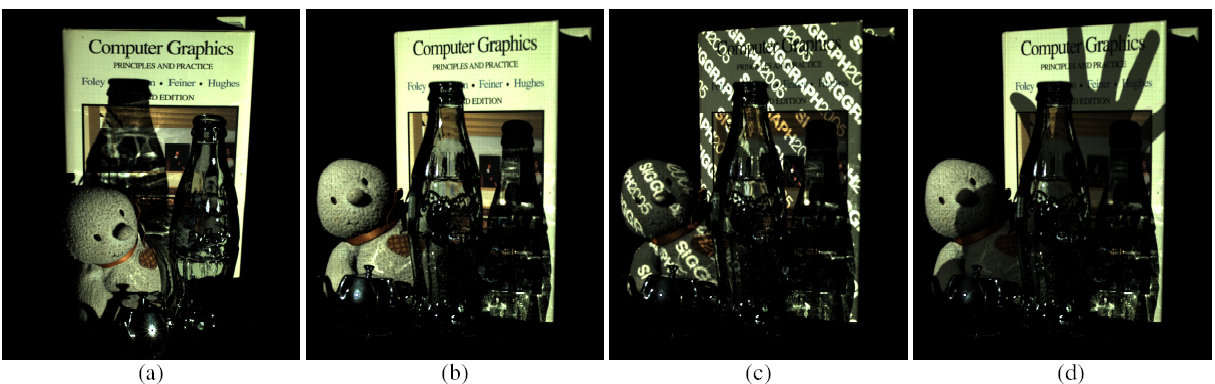
You'll notice something funny about this, which is that using T', we can reconstruct the scene as if it were viewed by a camera where the projector was, and lit by a projector where the camera was. The authors show that this actually works, and describe some tricks they played to get it working well. See the pictures below: the second, third, and fourth pictures can all be synthesized from the matrix T, despite the fact that the scene was never photographed from that angle.

The authors then use this technique to (I am not making this up) read the back of a playing card. Watch the video (linked from the web page), then read the paper.

The approach works no matter what the resolutions of the camera and projector are. You can even take a picture using a projector and a photodiode (i.e. a single element light sensor), because the effective resolution of the virtual camera is the resolution of the projector.

A web hosting recommendation: NFSN

This year I started hosting my personal web site with nearlyfreespeech.net. I have nothing but the best to say about them.

NFSN is a virtual hosting service, which means that small sites don't pay for capacity they aren't using, and large sites are automatically load-balanced. NFSN-hosted sites regularly get links from Slashdot, Digg, etc. and they stay up.

Pricing: NFSN is pay-as-you-go: bandwidth starts at $1/GB and goes down based on your usage, and storage is $0.01/MB/month. I'm paying less than $7/month for my site, and most of that only because I'm running a web app that's a derivative of Wikipedia. No stupid pricing tiers here.

Environment setup: you can set up your shell for public-key access over SSH. Their environment comes with Emacs 22 and git installed, which means that, for once, my web host shell is actually useful and not just a pale shadow of a real working environment. (Yes, vim 7.1, bzr, hg, SVN, and CVS are installed too.)

Abuse policy: here is a clip from their abuse FAQ:

A NearlyFreeSpeech.NET member site is defaming me or otherwise injuring me civilly.

Please forward a copy of your legal finding from a court of competent jurisdiction to our contact address. If you have not yet obtained such a finding, a preliminary injunction or court order is also sufficient.

The rest of it reads similarly. It is nice that there are web hosts out there that respect their customers, even when those customers don't have absurdly priced SLAs.

Making backups (instructions for GNU/Linux)

The cardinal rule of backing up is: assume that any one of your hard drives could go up in smoke at any moment. Zap. Could be right now. Magnetic disks will fail, and it's not a matter of if, but of when. (Backups will also save you from some user error, although that is not their primary purpose.)

Once you are thoroughly convinced of that, you will be nearly paranoid enough to implement a good backup strategy. This may seem awfully depressing, but the great news is that storage is cheap these days. As of this writing, you can get a 500GB hard disk for under $100. Having a full backup of your files when your primary disk breaks into tiny pieces is worth a lot more than $100. I've lost three disks in the last three years. In no case did I lose any data.

I am not willing to mess with the hardware or software needed to configure a RAID, so my backup solution (based on jwz's PSA) involves a second hard disk and rsync on a cron job.

Whenever I get a new hard disk for a computer, I generally make it the primary disk (containing /, /home, and swap) and graduate the previous disk to the role of a backup and swap disk. The backup partition is formatted with ext3, just like my root and home partitions. Suppose that the backup partition on the second disk is mounted at /media/sdb1 and I want to backup my homedir to /media/sdb1/phil. (My system is pretty much a stock Ubuntu install, so there is little value in backing up stuff outside of /home.)

The following script, archive-homedir, rsyncs my homedir to the backup disk:

rsync -vaxE --delete --ignore-errors /home/phil/ /media/sdb1/phil/
touch /media/sdb1/phil/last-backup

The options basically mean: print the files being copied; preserve timestamps and permissions; don't descend into other filesystems mounted under your homedir; delete files in the backup when they get deleted on the main partition; and ignore errors. The script also touches a file so you can see at a glance when the last backup was made.

This crontab file backup.crontab causes a backup to happen every day at 6AM:

0 6 * * * /path/to/archive-homedir

Install and activate it with crontab /path/to/backup.crontab. If your cron is configured to email you with the job output, you will get the list of files that was backed up every morning. Watch out for messages telling you that your disks could not be read or written. These generally mean that you need a fsck or a new disk.

I use the same kind of setup to back up my laptop disk over the network. On my laptop, archive-homedir looks like this:

rsync -vaxE --delete --ignore-errors --delete-excluded \
--filter="merge /path/to/archive-exclude-patterns" \
/home/phil/ desktop:/media/sdb1/laptop/

where archive-exclude-patterns is a file with a list of filter rules that instruct rsync to include or exclude certain files. I use this file to tell rsync not to back up some files that are not worth transferring over the network, like my web browser cache. My archive-exclude-patterns looks like this:

- /.local/share/tracker/
- /.local/share/Trash/
- /.mozilla/firefox/*/Cache/
- /.thumbnails/

On my laptop, I don't run archive-homedir on a cron job, but I do run it whenever I'm on the same LAN as my desktop.

Emacs in Ubuntu Hardy now has anti-aliased fonts

Update, 7 August 2009: the most recent major release of Emacs (v. 23.1) now has the anti-aliased font support. See the Ubuntu elisp PPA, which contains packages for any recent Ubuntu release, or see installation instructions for various other platforms.

The latest emacs-snapshot-gtk packages in Ubuntu Hardy (1:20080228-1) have the Unicode/font changes merged, and now support anti-aliased fonts for the first time.

While I didn't really mind the old bitmap fonts, I have to say that anti-aliasing is gorgeous.

To activate the new fonts, I added the following line to my ~/.Xdefaults:

Emacs.font: Monospace-8

Then, I ensured that the settings in .Xdefaults are being loaded by adding the following to my ~/.xsession:

if [ -f $HOME/.Xdefaults ]; then
  xrdb -merge $HOME/.Xdefaults
fi

Content-addressable storage

In Git, every file is stored under a hash of its content. One consequence is that a particular file is only ever stored once in the repository, regardless of how many versions it appears in and under how many names. Each of those instances is a pointer to the same blob of data.

I'm using Git to manage a large collection of binary files (scanned images). I'm using version control so I can add new data, replace bad scans, and rename or reorder files reversibly. I've noticed two great things about this:

First, since I frequently add new files and rename files, but only occasionally delete or modify them, the repository (containing the entire revision history) is only slightly larger than the actual current state of the repository. This is true for many kinds of binary data (e.g. photos, music), so it makes using Git very attractive: why would you keep one backup copy when, for about the same amount of space, you could have a complete version history?

Second, pushing changes is very fast. Even after I rename hundreds of files, Git doesn't need to push huge amounts of binary data (just a few kilobytes) because every file is already in the repository, except possibly under a different name. This is far more economical than rsync, which would attempt to re-transfer every file that had been changed.