Improving rename order in wdired

After using Emacs' wdired for some heavy-duty work, I noticed a flaw in how it does renaming.

Some background for those who do not know what wdired is (I find it indispensable!): wdired gives you a view of a directory that looks like the output of ls -l. However, you are allowed to edit the filenames. When you "save" the buffer, wdired renames all the files whose names you have changed. (More information: a blog post about wdired; Emacs manual node for wdired)

Here's the problem:

wdired always performs renames in a fixed order, starting from from the bottom of the buffer and going up. You can easily construct sets of renames where wdired unnecessarily thinks it has to clobber a file because it is doing the renames in the wrong order.

I improved wdired-finish-edit so that it does renames in the "right" order. I've posted the improved version on my web site.

While this does complicate the implementation a bit, the apparent model that wdired presents is that all the renames you ask for happen simultaneously, so I believe there is no reason when this new behavior would be inappropriate, assuming the code is not buggy.

Installing Debian the hard way is still easy

I prefer Ubuntu in general, but one thing that Debian has really nailed is installation. Last week I installed Debian on an old machine using no removable media other than a corrupted Ubuntu installation CD.

Under Debian's hard disk booting installation method, you download two files (a kernel and a disk image) to your disk, which are under 6MB in total. Then you ask grub to boot the kernel with the specified disk image. There is enough magic in there to launch a Debian installer that downloads all the packages it needs from the internet.

All you need to do is get those two files onto the disk. Easy ways to do this include: booting from a liveCD (or another functioning OS on the disk) and downloading them, or ripping out the disk and connecting it to another computer. Unfortunately, I did not have a good OS on the disk, nor a working liveCD, nor a PATA dongle.

The disk I was using already had grub installed. The Ubuntu installation CD got as far as formatting the drive, but couldn't install any packages because they were all corrupted. Fortunately, there is a recovery shell which includes, among other things, wget. That was enough to get the ball rolling for a successful Debian install.

Vulnerability in Debian's OpenSSL revealed

A weakness has been discovered in implementation of OpenSSL that Debian and Ubuntu provide. This random number generator has been shown to be predictable in certain ways. Consequently, encryption keys generated by OpenSSL, including SSH host keys and SSH public/private keypairs, should be considered compromised. (Upgrading to the latest version of openssl in Debian and Ubuntu will offer to regenerate your host keys.)

What is interesting is how this vulnerability was created in the first place. In order to create keys, OpenSSL acquires randomness from a bunch of sources and adds it to a buffer created in uninitialized memory.

Valgrind (a debugging/profiling tool) detects, among others, situations where programs do computations based on the results of uninitialized memory. These are almost certainly bugs. Except when the express goal of your program is to produce something random.

A Debian developer added the following patch to OpenSSL,

+       /* Keep valgrind happy */
+       memset(tmpbuf, 0, sizeof tmpbuf);
+

thereby replacing perfectly good semi-random data with zeroes. As it turns out, this is enough to greatly reduce the key search space for attackers.

Diagnostics (and compiler warnings, and the like) can be dangerous when interpreted by amateurs.

Copying directory trees with rsync

You can use cp -a to copy directory trees, but rsync can do the same and give you more flexibility. rsync supports a syntax for filter rules which specify which files and directories should and should not be copied.

Examples

Copy only the directory structure without copying any files:

$ rsync -a -f"+ */" -f"- *" source/ destination/

The two -f arguments mean, respectively, "copy all directories" and then "do not copy anything else".

Copy only directories and Python files:

$ rsync -a -f"+ */" -f"+ *.py" -f"- *" source/ destination/

This is really handy for replicating the general directory structure but only copying a subset of the files.

Copy everything but exclude .git directories:

$ rsync -a -f"- .git/" -f"+ *" source/ destination/

Conclusion

Of course, rsync also works great for copying files between machines, and it knows better than to transfer files that already exist on the destination. I use something similar to the above to do backups, copying my homedir but excluding stuff like caches that are not even worth copying.

Network transparency makes distance irrelevant

The recent version of Ubuntu and the upcoming version of Fedora both ship with PulseAudio, a sound server which supports, among other things, network-transparent operation: you can take any program that generates sound and redirect that sound to be played on any other machine with a PulseAudio server.

PulseAudio is part of a long and venerable history of using computers remotely. People have been using SSH and X11 forwarding for ages now. CUPS and SANE allow you to access a printer or a scanner from halfway around the world. x2x lets you move the cursor on one computer with the mouse on another. And SSH's port-forwarding feature builds bridges to enable pretty much any service to be used from anywhere, even if the server is behind a firewall or is only serving to localhost. Features like these aren't unique to the modern Unix-like operating systems, but it is only there that they are widely enough used that people actually rely on them to get things done. Perhaps more critically, it is only there that they are easy enough to configure that people can use them on an ad-hoc basis.

In contrast, Windows or Mac OS, users are very much tied to individual machines. It does not really occur to people that they could use more than one computer, or that they would even want to.

I think this reflects one of the philosophical differences between Unix-like operating systems and others. Under Unix, a computer provides a number of resources (such as software, data, computation capacity, or specialized hardware) from which you can pick and choose. Because of network transparency, physical proximity is unimportant. Channels of communication can be layered and rerouted arbitrarily. You can make computers work together as ensembles. Individual computers are fungible.

Just a few weeks ago, for my research work, I wrote a script to distribute the processing of hundreds of files among a bunch of free machines. SSH is set up with public-key authentication there, so all the distribution of work happens without human intervention. The whole thing, including parsing the input, distributing those jobs, and load balancing, is about 50 lines of Python, using software which is standard on most any actual GNU/Linux system.

I do not think it is accidental that this kind of flexibility started in OSes built on free software. People who are trying to sell you software licenses do not have as much incentive to allow individual computers to be used in whatever way you please.

Python is a great teaching language... for TAs

Repetitive tasks put the brain in a state where it is more likely to make mistakes, say scientists. I've been grading CS problem sets for 6.00 and I can personally attest to that. The drudge work in this class (for the TA, anyway) usually consists of verifying that the students' solutions produce expected behavior on a large set of test cases. I want to make the computer work for me as much as is possible here. Less drudgery for me means my students get more helpful high-level comments on their psets. Writing good tests takes time, but I would have spent more time testing and checking (and then second-guessing my error-prone self: "Did I grade that last student's code correctly...").

The conclusion I have come to in the last couple of terms is that Python is a great language to be teaching. The built-in unittest module makes organizing and writing tests, and reading their output, really easy.

However, all is not well, yet: non-determinism is the tester's constant foe! And Python, with its myriad libraries, lets you pull in code from pretty much anywhere you please. So much for having controlled and deterministic environments. The textbook example here of non-determinism is the time module.

Usually (read: in Java), people would deal with this using dependency injection or related techniques: basically, writing a function which takes the non-deterministic part as an argument. It works great, but cluttering the interfaces and specifications in this way is not something we really care to inflict upon fledgling programmers.

The great thing about Python is that you can patch pretty much anything at runtime. When combined with the fact that Python doesn't enforce data-hiding anywhere, this means that we can perturb and control the execution of students' code in some very interesting ways.

The most important effect of this is that it totally obviates the need for user interaction. Need to provide input to a student code? Just replace raw_input with a callable of your choice. Need to read printed output programmatically? Just replace sys.stdout. In Python, every module is really a dictionary to which you can add items whenever you like, so patching just looks like this:

import ps5

# Arbitrary callable that should return input to program under test
ps5.raw_input = fake_input
# Save the real stdout for later replacement
old_stdout = sys.stdout
# Redirect stdout to a string buffer
sys.stdout = StringIO.StringIO()

It's just up to me to write a callable (possibly with state) that provides the correct input(s), and some code to process the contents of the buffer, and then I can grade most assignments without running the student's code by hand.

I can even replace module-level "constants", or even entire libraries that the student relies on:

import ps5

ps5.time = fake_time

For example, fake_time might be a class instance that implements a time method, if we expect students to be calling time.time(). So we can run tests where the student's code has to measure the passage of time, and the test doesn't have to take some large constant amount of time to run. When the students are learning to use matplotlib, we have, for TA use, a fake matplotlib module that, when asked to produce a plot, actually conveniently saves that plot to disk.

By replacing dependencies at runtime, we can test pretty much any functional aspect of student code without requiring students to conform to some (apparently) unnatural interface in advance. The students are blissfully unaware of testability issues until we choose to introduce those issues.

We can also test many non-functional requirements. For example, suppose function A is supposed to run without calling function B for efficiency reasons: before calling A, just replace B with a wrapper that notices when it's called.

It's the 21st century. TAs should not be meticulously entering test inputs into computers and cataloguing the outputs. We have computers to do that for us.

Amazing Graphics Papers: Dual Photography

This is a summary of the technique in the paper Dual Photography, which was presented at SIGGRAPH 2005. What the authors managed to do is very clever, and you can even understand the technique without knowing much high-brow math. Color me impressed.

Imagine you are photographing a scene which contains objects lit by a lamp. Suppose the light source is replaced with a structured light source, basically a projector. We could turn all the pixels of the projector on and get what is essentially a lamp. But in general we could light just some of the projector pixels, and illuminate the scene with whatever weirdly shaped light we want.

Fact: light transport is linear. So the relationship between the input vector p (which pixels on the projector are lit) and the output vector c (the brightness on each camera pixel) can be described by a matrix multiplication: c = T p. The ijth element of the matrix T is the brightness of the ith camera pixel when the jth projector pixel (and nothing else) is lit with intensity 1. (If the camera and the light source both have resolution of, say, 103×103, then p and c both have length 106, and T is a 106×106 matrix.)

We can actually construct the matrix T by lighting the first pixel, taking a picture, lighting the second pixel, taking a picture, etc. (each picture yields one column of the matrix T). And once we've done this, we can plug in any vector p we want to see what our scene would look like with arbitrary illumination from the projector. So, once we have this matrix T which completely characterizes the response of this scene to lights, we can change the lighting of the scene in post-processing.

That's already kind of neat, but the most impressive trick here is based on the fact that light transport follows the principle of reciprocity. If light of magnitude 1 enters a scene from a projector pixel a and lights up camera pixel b with intensity α, then a ray of light could just as well have entered at b and exited at a, and that light will also be passed with the same coefficient α. This is easily seen if the scene contains mirrors, but it's actually true in general, even if light is partially absorbed, reflected in funny ways on the scene, etc.

Now, what happens if we swap the locations of the projector and the camera in our scene? What's the matrix T' associated with this new scene? Because of reciprocity, it's merely the transpose of the matrix T: all the coefficients are the same, but they move around because we've swapped the 'input' and the 'output' of our system.

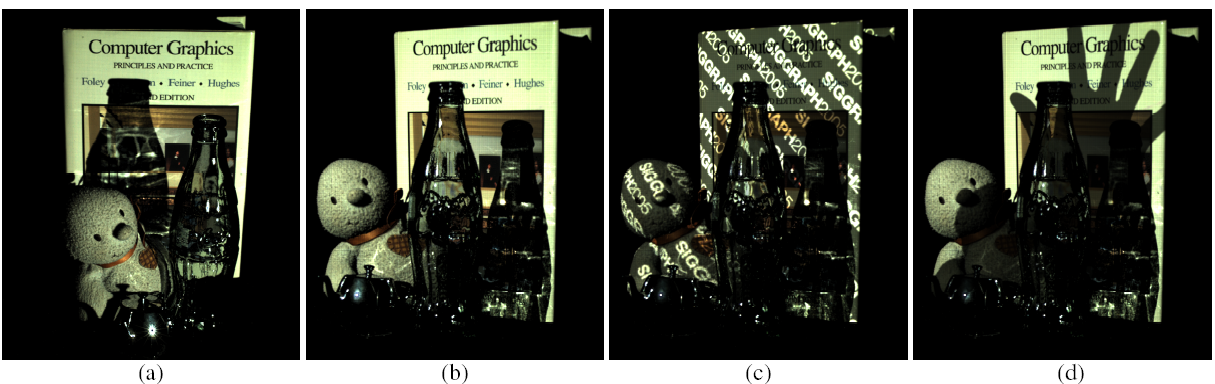
You'll notice something funny about this, which is that using T', we can reconstruct the scene as if it were viewed by a camera where the projector was, and lit by a projector where the camera was. The authors show that this actually works, and describe some tricks they played to get it working well. See the pictures below: the second, third, and fourth pictures can all be synthesized from the matrix T, despite the fact that the scene was never photographed from that angle.

The authors then use this technique to (I am not making this up) read the back of a playing card. Watch the video (linked from the web page), then read the paper.

The approach works no matter what the resolutions of the camera and projector are. You can even take a picture using a projector and a photodiode (i.e. a single element light sensor), because the effective resolution of the virtual camera is the resolution of the projector.