Emacs 23

Emacs 23 has been released. You can download it from GNU's FTP server.

The most notable new features or changes that I noticed or have been using:

  • A single Emacs process can generate frames on any number of TTYs and on X simultaneously. Run M-x server-start and then emacsclient -t or emacsclient -c to create a new TTY or X frame, respectively.
  • C-p and C-n now move by screen/visual lines instead of by logical lines. While this makes Emacs more consistent with most modern apps, it has the potential to break keyboard macros. If you use macros frequently, consider setting (setq line-move-visual nil) to disable this behavior.
  • Transient Mark mode is enabled by default. I find t-m-m is occasionally really handy, especially after the mark-* commands, and for restricting the region for query-replace. However, I think t-m-m highlights a little too aggressively. To disable t-m-m except after the mark-* commands, I use the following:
  • (transient-mark-mode 0)
    
    ;; Activate t-m-m only after mark-* commands (you can also enable it manually
    ;; at any time with C-u C-x C-x).
    (require 'cl)
    (macrolet
        ((advise (&rest commands)
                 `(progn
                    ,@(mapcar (lambda (command)
                                `(defadvice ,command (after transient-mark activate)
                                   "Activate Transient Mark mode temporarily."
                                   (setq transient-mark-mode '(only))))
                              commands))))
      (advise mark-sexp
              mark-word
              mark-paragraph
              mark-defun
              mark-end-of-sentence
              mark-page
              mark-whole-buffer
              LaTeX-mark-environment
              LaTeX-mark-section))
  • C-l is bound to recenter-top-bottom, which moves the viewable area so that the current line is at the center, top, or bottom on successive presses. Useful for surveying the area around point.
  • DocView mode, new, is a PDF/PostScript/DVI viewer.
  • Emacs is smarter about splitting windows (e.g. after C-x 4 C-f), splitting vertically if your frame is sufficiently wide.
  • Beautiful anti-aliased fonts.

There are many, many, more changes. See etc/NEWS for the gory details.

On emacs-devel, I recently got a pointer to Richard Stallman's 1981 paper on the design of Emacs, presented at the ACM Conference on Text Processing:

Extensibility means that the user can add new editing commands or change old ones to fit his editing needs, while he is editing. EMACS is written in a modular fashion, composed of many separate and independent functions. The user extends EMACS by adding or replacing functions, writing their definitions in the same language that was used to write the original EMACS system. We will explain below why this is the only method of extension which is practical in use: others are theoretically equally good but discourage use, or discourage nontrivial use.

Extensibility makes EMACS more flexible than any other editor. Users are not limited by the decisions made by the EMACS implementors. What we decide is not worth while to add, the user can provide for himself. He can just as easily provide his own alternative to a feature if he does not like the way it works in the standard system.

It is striking how so little software today, even "professional" software that users are apt to use 8 hours a day, is actually designed to facilitate extensibility and automation by users.

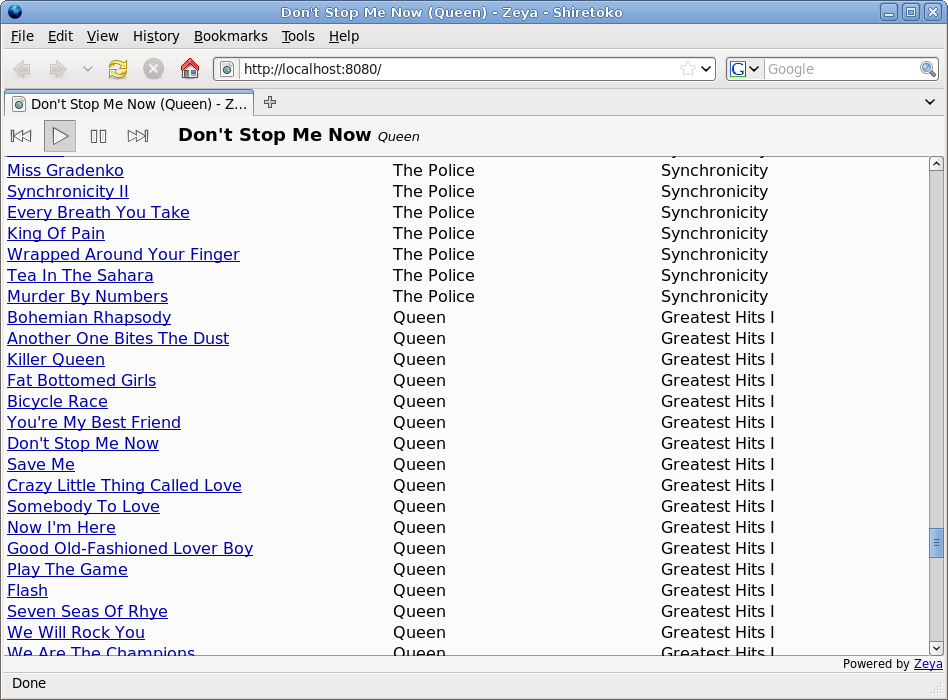
Zeya: bring your music anywhere

I love SSH. One reason is that I love being able to get to my files from anywhere on the planet without any advance planning.

After using SSH for a while, carrying my bits around with me on magnetized platters or EEPROMs inside a laptop/phone/PMP just seems so quaint and irritating. It leads to a host of problems: you have to worry about synchronizing, deciding what to synchronize, merging changes, and misplacing your device. Usually, some bizarre cable is involved in transferring data. And invariably, there's that one spreadsheet, paper, song, or ebook that you tragically can't view because you left it on your computer at home.

(Incidentally, I think using cloud hosted storage/apps is one approach, but not a complete solution, at least yet.)

Introducing Zeya

While SSH is great for the vast majority of application classes, I think effectively accessing audio/video remotely requires more specialized tools.

To this end, I spent a few days writing Zeya, a music server that takes your Rhythmbox music collection and streams songs from it to you. However, unlike gnump3d or ampache, Zeya presents a full music player right in your web browser, using the goodness of HTML 5. No Flash, no Silverlight, no Java applets, no plugins, no popups, no invoking external players, no client-side software installation.

Zeya brings your music to any computer with a web browser (OK, as long as the browser is Firefox 3.5, for the moment). Play songs from your collection on your desktop at work. Or on your netbook at Starbucks. And now or soon, when you get a current-gen web browser on your phone/MID/fridge, you can bring all your music there too.

Picture iTunes' library sharing. Now imagine that its functionality wasn't crippled to lock users in to iTunes. Oh, and you could actually access it from outside your LAN. Oh, and that you could listen from any computer, anywhere, without installing any software. I think Zeya in its current state is just a pale shadow of what is really possible when you actually try to make information really easy, rather than just marginally less difficult, to get to.

Samson Yeung and I have been working on, and using, Zeya for a few days now. It's pretty useful and easy to get running, but it is feature-bare, experimental, and subject to change in all sorts of fun and interesting ways. If that doesn't scare you, visit

http://web.psung.name/zeya/,

try it out, and let me know what you think.

Why I can't afford proprietary software

The following happened at the lab a few months ago:

Date: Fri, 12 Dec 2008 12:16:52 -0500
To: matlab-users

Hi All,

Seems we've exceeded our pool of Matlab licenses.  We will be getting
more but unfortunately it takes 5-10 days to do so.

In the mean time please don't take up any more licenses than you
absolutely need and close instances you are not using.  We have some
people with tight paper deadlines that are unable to get licenses.

Thanks for your cooperation in this.

Just like that, for a handful of people, research work slowed to a crawl for almost a week at the end of the semester.

This kind of stuff makes my blood boil. There is no logical reason we have to ration software as if it were gasoline. But that's another rant. Enforcing unfortunate license restrictions is completely within The Mathworks' rights under the law.

I bring this up because I think it hints at the elephant in the room, namely:

When you use proprietary software on your computer, it's not your computer anymore.

That's the reason I'll talk my head off about free software and the reason I'm not going to stand for Matlab, Windows, Mac OS, Microsoft Office, the iPhone, , the Kindle, Flash, Skype, etc.— none of it. (Mathematica is a jaw-dropping technical achievement. And I still won't touch it with a ten-foot pole.) The moral of the story is not that you should double-check your Matlab license paperwork. No, this is par for the course, and just a symptom of the real problem: that proprietary software companies can enforce totally capricious and arbitrary restrictions on what we can and can't do with our computers, and that they have a well-documented history of doing so. So the less we have to rely on them, the better.

I am always a bit incredulous when people advocate proprietary software on the basis of things like ease of use or good design or shininess or intuitiveness or speed or usability or "it just works" or architectural superiority or elegance. It's not that I don't value those things. I'm an engineer myself, so I appreciate the effort that goes into making things work and work well. But what good is speed if you can't go anywhere? What good is usability if you can't fucking use your software? If you don't have two shreds of basic personal autonomy, worrying about other things seems kind of superfluous, no?

(It's just galling how most proprietary software has awful usability, but that's also another rant.)

You are probably skeptical, and rightfully so, about the true magnitude of the problem I'm complaining about here. This is not just an issue with a few bad apples (as it were...). It's a fundamental problem of incentives. When you pay for a license for bits, the vendor has an incentive to protect future sales by curtailing the possible uses of those bits. They certainly have the power to enforce whatever restrictions they wish and to change them up at any time. And they'll put time and effort into it, because you can't remove, inspect, or enumerate those restrictions. Maybe you think things are not so bad now, and indeed, maybe they aren't. But the rules can change arbitrarily and at any time, and I mean arbitrarily and at any time. (Three words: iPhone app store.) In the world of proprietary software, there are no sure things.

To put it succinctly, if you don't have the four freedoms, the people who make your software have the means, the motive, and the opportunity to cripple their products to extract as much money from you as they can. There is something deeply perverse and broken about this kind of business model. Remember the lesson from game theory: trust people when, and only when, it's in their best interest to help you.

It's not that I can't afford to pay for nice things. (What's $29, or even $1399, if it helps you get your job done? A bargain!) What I can't afford is paying for the privilege of letting someone have me by the throat (or elsewhere).

Making your own page-a-day calendar

Anomalously, today's post is about a DIY physical artifact.

A while back, I made a custom page-a-day calendar as a gift for my girlfriend. Each page tears off and has a picture on it. (Unfortunately, I don't have any photos of the finished product.)

With just a little effort, you can make one of these things and have it look quite professional. You can fill the pages with whatever photos, comics, etc. you want. And, I can virtually guarantee you, your recipient has never had a page-a-day calendar typeset in Computer Modern.

Here are skeletal instructions for making your own. You'll need a printer, ink or toner, most of a ream of paper, some padding compound, a paper cutting device/facility, cardboard, LaTeX, and time.

1. Get source images

Acquire 365 images from Flickr, your photo collection, your favorite CC-licensed webcomic, or whatever strikes your fancy. This post on curl may come in handy. Some notes: (1) Layout is much easier if the images are the same aspect ratio. (2) Consider upsampling the images if needed, e.g. with imagemagick, so you can print at a respectable DPI. Henceforth I'll assume you've named the images imgs/001.jpg, imgs/002.jpg, etc. If this is not the case, simply adjust the code in Steps 2 and 3 accordingly.

2. Use this LaTeX skeleton

Make a new TeX file and fill it with this:

\documentclass[17pt,oneside,final,showtrims]{memoir}
\usepackage{marvosym}

\setstocksize{11in}{8.5in}

\settrims{0in}{0in}

\settrimmedsize{4in}{6in}{*}
\settypeblocksize{3.5in}{1.75in}{*}
\setlrmargins{0.25in}{*}{*}
\setulmargins{0.05in}{*}{*}
\setheadfoot{0.01in}{0.1in}
\setheaderspaces{*}{*}{*}
\setmarginnotes{0.25in}{3.5in}{0in}

\checkandfixthelayout

\pagestyle{empty}

\usepackage[final]{graphicx}

\pagestyle{empty}

\newcommand{\daypage}[6] {
  \marginpar{\includegraphics[height=3.4in]{imgs/#1.jpg}}
  \begin{center}
    \Large{#2} \\
    \HUGE{\textbf{#3}} \\
    \large{#4}

    \vspace{0.4in}
    \small{#5}

    \vspace{0.2in}
    \scriptsize{\textit{#6}}
  \end{center}
  \newpage
}

\begin{document}
  % Cover page
  \marginpar{\includegraphics[height=3.4in]{imgs/cover.png}}
  \newpage

  \include{tex-days}
\end{document}

Salient points:

  • The \daypage command generates a new page. You supply arguments specifying the parameters for each page: the filename of the image to include, the day and date, a line indicating whatever holiday it might be, etc. Play around with the layout, especially if you're using images of different aspect ratios than I did or if you have a calendar stand of a particular size.
  • If you want a cover page, supply a cover.png; otherwise, remove the corresponding lines from the template.

3. Generate the pages

The template above includes tex-days.tex, which might look something like this:

[...]
  \daypage{182}{Sunday}{03}{Jul 2005}{~}{~}
  \daypage{183}{Monday}{04}{Jul 2005}{Independence Day}{~}
  \daypage{184}{Tuesday}{05}{Jul 2005}{~}{~}
  \daypage{185}{Wednesday}{06}{Jul 2005}{~}{~}
  \daypage{186}{Thursday}{07}{Jul 2005}{~}{~}
[...]

You can generate a skeletal version of this, sans holidays, with a quick Python program. I've provided a sample tex-days.tex file for the year 2010.

The first argument on each line indicates the filename, e.g. 182 indicates that 182.jpg should be included. Make sure these match the filenames you are using. The sample file assumes your images are named 1.jpg, 2.jpg, etc. If this is not the case, either create your own version or rename your files.

If you're interested in embellishing the output, the 5th and 6th arguments on each line provide supplementary text to go on each page (#6 is printed in smaller type than #5). You can fill in, by hand or programmatically, whatever notations you want here, e.g., holidays, birthdays, anniversaries, or a countdown to whatever.

Arguments 2, 3, and 4 give the day of week, date, and month/year respectively that are displayed, in case that wasn't clear.

4. Produce and print

Run the file through pdflatex and print it! Make sure the alignment is consistent across pages.

The showtrims argument in the template file makes LaTeX print trim marks on each page. However, you really only need trim marks on the first page. If you're obsessive-compulsive, you could print the first page with trim marks and the rest without to guarantee the marks won't show on the finished product.

5. Trim it

I took the stack of paper, with pieces of thin cardboard above and below it, to my local Kinko's (now Fedex Kinko's, I guess). I asked them to cut the stack along the trim marks (2 cuts, since 2 of the edges already run up again against the page edges). They did this for a fee of just $1/cut.

6. Bind it

Get some padding compound, e.g. Sparco padding compound. (I bought a quart, so I can probably make gift calendars/notepads for years.) Align the cut pages, leaving one piece of cardboard on the bottom, and put the stack in a vise. (In a jam, "under a pile of hardcover books" will do.) Using a paintbrush, paint the top edge of the stack with padding compound. Wait for it to dry. Paint another coat.

If you have random loose paper, padding compound is also handy for recycling it into notepads.

7. Mount it

This is not really needed, but is a nice touch. Find an old stand for a page-a-day calendar. Glue the cardboard backing in.

I hereby place the LaTeX template and LaTeX snippets in this post into the public domain.

A different approach to fighting phishing

We are usually advised to avoid being phished by looking carefully at the address bar for discrepancies. Unfortunately,

The web page; the URL; the SSL certificate (if any); indeed, all information displayed to the user; is information chosen by the attacker. The user is then asked to discover discrepancies in information that has been carefully designed for deception. This type of game is better suited to a book of puzzles than a secure user interface. —Tyler Close

The problem is that humans are notoriously bad at detecting rare and non-obvious events.

The Petname tool is a nifty alternative way to detect and expose phishing. It's a Firefox extension that lets you enter short messages (e.g. "stock trades") to be associated with a site's CA public key and distinguished name (DN). Those messages are only subsequently displayed to you when you return to the site if the key and DN match.

This is somewhat similar to the approach used in SSH. That is, on the second and subsequent transactions between you and another party, it's not quite as valuable for you to know simply whether some trusted CA will vouch for that party. What you really want to know is that you are talking to the same party you were talking to last time. (As with SSH, man-in-the-middle attacks on the second and subsequent logins can be detected... even if the user didn't properly verify the authenticity of the remote party on the first login!)

Of course, all this is of little use if the human doesn't check the petname before entering his password. For that, the author suggests that web browsers be made to automatically manage credentials on our behalf...

Further reading: W3C workshop paper

Chrome is blazing

I've been using the Chromium builds off and on for some time now and finally changed my default browser to Chromium. The two major reasons that sold me:

One. It is blazing. In comparison, Firefox 3.5 is now intolerably slow. I don't even want to try Firefox 3.0. This is both for rendering time and startup time. (Startup from a cold cache: 1 sec for Chromium, 10 sec for Firefox. That's right, Chromium loads in one second on my 8 year-old computer.)

Two. The "omnibox" (the unified area for selecting URLs, searches, and bookmarks). It works fantastically. Now, Firefox's implementation (the "awesomebar") is pretty admirable. They too support searching bookmarks and history and have a fairly sophisticated filtering language for narrowing the suggestions. But, as far as I can tell, in order to actually use any of the suggestions you have to move your hands away from the home row, down to the arrow keys to press "Down".

From a UI perspective, this is snatching defeat from the jaws of victory. (In Chromium, pressing Enter in the omnibox selects the first completion.)

Chromium is still a no-frills browser, and I still miss some Firefox extensions (okay, okay, only one). But it's already good enough that using Firefox regularly is just unbearable now. Hats off to the Chromium engineers!

Making gorgeous LaTeX plots with Octave

I previously wrote about using the epslatex terminal in Gnuplot to generate beautiful plots for inclusion in a LaTeX document. The secret is that the epslatex terminal produces a combination of (1) EPS vector graphics and (2) TeX instructions to overlay all the text (axis labels, legends, etc.) in whatever font you are using in the rest of your document. So typically you get that super slick looking Computer Modern Roman (cmr) font.

Now, there are some things that are beyond the ken of Gnuplot. So it was a relief when I learned that GNU Octave can produce similarly formatted EPS + TeX graphics. What's nice about using Octave instead of Gnuplot is that, not only can you take advantage of Octave's more advanced (as I understand it) graphics facilities, but you can also bring to bear all the power of a full mathematical/simulation language for preprocessing your data or whatnot. I still usually use Gnuplot, but I break out Octave for making plots when necessary.

All you have to do is produce your plot in Octave as normal (e.g. plot(...)), and use a command like the following to output in EPS + Tex:

print('my_plot.tex', '-dtex');

As an example, here's some minimal code to produce a heatmap with contours and a legend:

x_values = [0.10 : 0.005 : 0.60];
y_values = [0.10 : 0.005 : 0.60];
contourf(x_values, y_values, data); % supply your own data...
axis square;
colorbar;
xlim([0.1 0.6]);
ylim([0.1 0.6]);
print('-dtex', 'my_plot.tex');

Octave really saves the day here. To the best of my knowledge it is difficult or impossible to do this using just plain Gnuplot, especially if you are not plotting over a square area.